Tampilkan postingan dengan label Unlock. Tampilkan semua postingan
Tampilkan postingan dengan label Unlock. Tampilkan semua postingan
Jumat, 01 Mei 2015
Tutorial unlock phone without PC or Laptop
A PDA phone becomes an important part of your life whether you are a student or business professional. It allows you to keep track of upcoming meetings, tasks and projects. Some have even advanced over the years, allowing you to email your colleagues, surf the Web and share documents. However, you cannot use a PDA if you find that yours has a lock on it. Do not get rid of that phone just yet. There are a few ways of unlocking the PDA yourself.
Find unlock codes on the Internet at websites such as Fones Zone, PDA Unlocker and The Travel Insider. Locate the unlock code by your PDAs brand name and model number.
Contact your cell phone provider. Tell the representative that you need to unlock your phone. Verify that you are the owner of your PDA by providing your full name, address, telephone number and the last four digits of your Social Security number.
Enter the code into your phone once prompted. Verify that you entered the right code into your PDA. Press "OK" or the menu button when complete. You should now be able to use your PDA.
1. Make sure the hh (Handheld) turned on, not flight mode, then enter in hh EPST menu. Make each handset type & operator, the dial keypad to be different. For example Verizon TP1, press ##7764726# (## PROGRAM #). While Sprint TP2 code ##778# (##PST#), after is replaced by the ROM Energy, use code ##778.
Contact your cell phone provider. Tell the representative that you need to unlock your phone. Verify that you are the owner of your PDA by providing your full name, address, telephone number and the last four digits of your Social Security number.
Enter the code into your phone once prompted. Verify that you entered the right code into your PDA. Press "OK" or the menu button when complete. You should now be able to use your PDA.
1. Make sure the hh (Handheld) turned on, not flight mode, then enter in hh EPST menu. Make each handset type & operator, the dial keypad to be different. For example Verizon TP1, press ##7764726# (## PROGRAM #). While Sprint TP2 code ##778# (##PST#), after is replaced by the ROM Energy, use code ##778.
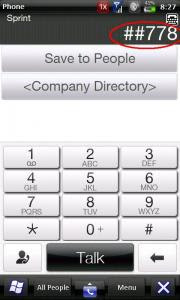

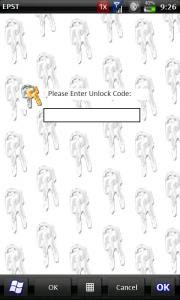
2. After entry into EPST menu, View ESN (HEX) code. to test our phone lock or not, try to select edit and enter the unlock code standard, which is 000000. if successful, means the unlock code was used.
to know the unlock code to edit the registry.
Install a registry editor for windows mobile. you may use Resco explorer, ceregeditor, PHM registry editor, mobile registry editor, etc.
Open the registry editor, go to HKEY_LOCAL_MACHINE SOFTWARE HTC ATDbgLog.
Change the contents of the registry "Enable" from "o" to "1" (without the quotes). Save & restart hh.
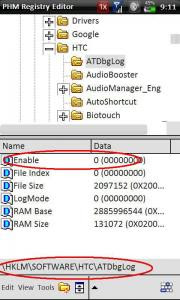
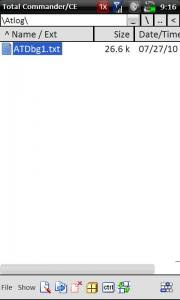
After the restart, can be checked in file explorer, will appear ATDbg file *. txt (* = number) in the folder Atlog. if not just look at folder Temp.
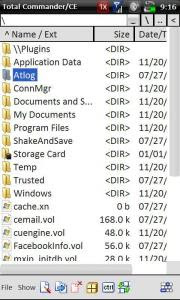
Wait a few minutes, open the registry editor, go back to the HKEY_LOCAL_MACHINE SOFTWARE HTC ATDbgLog. change "1" to "0". Save & restart hh.
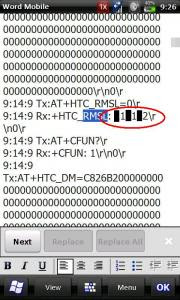
Open the *. txt file ATDbg, look for the "Rx: + HTC_RMSL:" 6 digits are written afterwards, it is our MSL code. if there is some repetition RMSL and 6 different digits, record everything and then try.
3. EPST entry, record the number ESN (Hex), of which we submitted to the operator. purchase number, we will be able to have a MIN. The operator will register your ESN + MIN to the database, and produce A-Key is that we must insert to hh.
4. Prepare the PRL file from the intended operator, eg smart PRL 10 009. save as native format (*. PRL) in the memory card / hh internal storage.
4. Prepare the PRL file from the intended operator, eg smart PRL 10 009. save as native format (*. PRL) in the memory card / hh internal storage.

Senin, 19 Januari 2015
Cara Unlock Bootloader (UBL) Sony Xperia Via CMD
Setelah beberapa waktu lalu saya mencoba untuk melakukan Unlock Bootloader yang caranya bener - bener ribet karena harus menggunakan aplikasi seperti flashtool.
Kini saya di permudah oleh sebuah tutorial yang saya dapet di youtube dan saat ini saya akan berbagi cara mudah Unlock Bootloader dengan menggunakan CMD tanpa harus susah - susah download aplikasi seperti flashtool ataupun yang lain, kita cukup pakai program windows langsung bisa UBL dengan mudah.
Kini saya di permudah oleh sebuah tutorial yang saya dapet di youtube dan saat ini saya akan berbagi cara mudah Unlock Bootloader dengan menggunakan CMD tanpa harus susah - susah download aplikasi seperti flashtool ataupun yang lain, kita cukup pakai program windows langsung bisa UBL dengan mudah.
Referensi :
- Unlock Bootloader (UBL) akan menghapus semua data di handphone sobat jadi backup data sobat agar tidak hilang
- Cara backup bisa cek di mbah google => Cek this
- Siapkan device Xperia
- Download - Driver USB Sony
- Download - Fastboot
- Dial *#*#7378423#*#*
- Pilih Service info > Configuration.
- Pastikan pada Rooting status terdapat tulisan Bootloader Unlocked Allowed: Yes
- Jika pada lingkaran kuning seperti gambar diatas ternyata hasilnya NO itu artinya HH sobat tidak bisa di Unlock,
- Buka situs unlockbootloader sony => disini
- Scroll kebawah => pilih tipe Xperia sobat => Continue
- Masukkan email sobat untuk verifikasi => ceklis pada Terms & Condition > pilih Submit
- Login ke akun email yang kalian daftarkan tadi kemudian cek email dari Sony > Klik pada link yang diberikan Sony
- Cek IMEI, dial *#06#
- Masukkan nomor IMEI tersebut tapi 1 digit terakhir jangan di masukkan.Contoh : IMEI 123456789001234 maka cukup masukkan 12345678900123 (untuk pengguna Dual akan ada 2 IMEI, cukup masukkan IMEI yang pertama saja)
- Ceklis pada Terms & Condition > pilih Submit
- Simpan kode unlock yang diberikan
CARA UNLOCK BOOTLOADER (UBL) DENGAN CMD
- Ekstrak Flashtool drivers kemudian instal seperti biasa (yang kesulitan menginstal karena memakai windows 8 => Cek disini)
- Ekstrak Fastboot yang tadi sobat download
- Pada computer, buka folder Fastboot yang tadi sobat download
- Tekan dan tahan SHIFT + Klik kanan dan pilih "Open command window here" pada folder fastboot
- Pada ponsel sobat masukan ke Mode Fastboot
- Dalam beberapa kasus, ponsel xperia rata-rata harus mematikan handphone terlebih dahulu
- Kemudian tekan tombol Volume up
- Sambungkan ponsel ke PC dengan USB hingga muncul (LED BIRU)
- Ketika masuk ke CMD ketikkan atau copas kode berikut untuk cek apakah ponsel xperianya sudah terdeteksi oleh computer
fastboot.exe -i 0x0fce getvar version
- Setelah terdeteksi kini waktunya untuk Unlock Bootloader
- Ketikkan kode berikut namun pada warna merah ganti dengan kede unlock yang tadi sobat saya suruh menyimpannya
KODE yang saya maksut adalah kode yang tadi didapat dari email yang dikirim oleh sony
fastboot.exe -i 0x0fce oem unlock 0xKEY
- Tunggu higga proses selesai, Jika terdapat pesan OKAY itu tandanya ponsel xperia sobat sudah berhasil di unlock boot loadernya.
- Cabut kabel USB ponsel dari computer, kemudian nyalakan ponselnya.
- Kini XPERIA sobat sudah unlock bootloader
- Enjoy.
CEK HH APAKAH SUDAH UNLOCK ATAU MASIH LOCK
- Dial *#*#7378423#*#*
- Pilih Service info > Configuration.
Jika ada beberapa tutorial yang membuat sobat bingung, jangan pernah ragu untuk bertanya pada kotak komentar yang sudah disediakan khusus bagi pengunjung yang ingin bertanya atau memberikan kritik serta saranya.
cara unlock bootloader sony xperia tipo,unlock bootloader sony xperia x8,unlock bootloader sony xperia p,unlock bootloader sony xperia j,unlock bootloader sony xperia ion,unlock bootloader sony xperia go,unlock bootloader sony xperia x10,unlock bootloader sony xperia zl,xperia sony qwertyuiopasdfghjklzxcvbnnmroot android bootloader unlockhtc unlockxperia yourtekhelperchange android version 4.4 4.2 4.3 4.1 kitkat jelly beanbest androidgalaxy android changemega y s duos 123456789grand 2 change androiddo editing on androidbest rom for xperia galaxy onemicromax canvas roothow to install kitkat on nexus 4xperia sp vs nexus 4xperia sp android 4.3xperia sp android updatexperia sp android kitkatxperia sp reviewxperia sp custom rom exinstenz rom omni romhonamixperia sp android 4.3 update by sonyxperia sp 4.3 root unlocked bootloader locked bootloaderxperia sp root latest romyourtekhelperxperia sony qwertyuiopasdfghjklzxcvbnnmroot android bootloader unlockhtc unlockxperia yourtekhelperchange android version 4.4 4.2 4.3 4.1 kitkat jelly beanbest androidgalaxy android changemega y s duos 123456789grand 2 change androiddo editing on androidbest rom for xperia galaxy onemicromax canvas roothow to install kitkat on nexus 4xperia sp vs nexus 4xperia sp android 4.3xperia sp android updatexperia sp android kitkatxperia sp reviewxperia sp custom rom exinstenz rom omni romhonamixperia sp android 4.3 update by sonyxperia sp 4.3 root unlocked bootloader locked bootloaderxperia sp root latest romyourtekhelperxperia sp qwertyuiopasdfghjklzxcvbnm locked bootloader rooting methodXPERIA UNLOCK BOOTLOADER OFFICIALunlock bootloader sony xperia qwertyuiopasdfghjklzxcvbnm sola tipo z zl zr zs z 123 sp m 2 t 2 e 1
Cara Unlock Bootloader (UBL) Sony Xperia Via Flashtool
Beberapa waktu yang lalu saya pernah berbagi tentang cara bagaimana melakukan UBL (Unlock Bootloader) menggunakan CMD, namun sepertinya teman - teman yang menggunakan cara tersebut agak sedikit kesulitan, padahal menurut saya menggunakan CMD lebih mudah karena sangat simple dan tidak perlu download flashtool.
Pada kesempatan kali ini kita akan membahas secara tuntas dan akan saya permudah ketika melakukan UBL terhadap Hp sobat nah sebagai contoh saya disini menggunakan Xperia M2 Dual namun jika sobat mau menggunakan yang lain juga tak masalah.
Pada kesempatan kali ini kita akan membahas secara tuntas dan akan saya permudah ketika melakukan UBL terhadap Hp sobat nah sebagai contoh saya disini menggunakan Xperia M2 Dual namun jika sobat mau menggunakan yang lain juga tak masalah.
Referensi :
Langsung kita mulai.Download Bahan - bahan untuk UBL
- Download - Flashtool driver
- Download - Flashtool 0.9.18.3
Cek dukungan UBL
- Pilih Service info > Configuration.
- Pastikan pada Rooting status terdapat tulisan Bootloader Unlocked Allowed: Yes
- Jika pada lingkaran kuning seperti gambar diatas ternyata hasilnya NO itu artinya HH sobat tidak bisa di Unlock,
Dapatan Key UBL
- Buka situs unlockbootloader sony => disini
- Scroll kebawah => pilih tipe Xperia sobat => Continue
- Masukkan email sobat untuk verifikasi => ceklis pada Terms & Condition > pilih Submit
- Login ke akun email yang kalian daftarkan tadi kemudian cek email dari Sony > Klik pada link yang diberikan Sony
- Cek IMEI, dial *#06#
- Masukkan nomor IMEI tersebut tapi 1 digit terakhir jangan di masukkan.Contoh : IMEI 123456789001234 maka cukup masukkan 12345678900123 (untuk pengguna Dual akan ada 2 IMEI, cukup masukkan IMEI yang pertama saja)
- Ceklis pada Terms & Condition > pilih Submit
- Simpan kode unlock yang diberikan
Cara UBL dengan Flashtool
- Setelah semua persyaratan diatas sudah terpenuhi maka lanjutkan ke vara UBL
- Matikan HH sobat.
- Install driver yang tadi sobat download
- Ingat.!! Ketika menginstall driver hanya centang 2 pilihan paling atas
- Install flashtool
- Buka flashtool kemudian pilih "UBL" jika muncul kotak dialog seperti gambar berikut
- Tekan Vol (-) tahan sambil menghubungkan HH via kabel USB ke komputer
- Masukkan KEY yang tadi sobat dapat dari sonymobile.com
- Setelah muncul OKAYdan Finished seperti gambar di bawah ini itu artinya sobat sudah berhasil UBL HH sobat
- Lepaskan kabel USB dan nyalalakan HH sobat.
- Untuk mengeceknya sobat bisa cek dengan cara Dial *#*#7378423#*#*
- Pilih Service info > Configuration
- Jika pada HH sobat infonya seperti pada gambar yang saya lingkari itu artinya sobat udah berhasil.
- Enjoy
Selamat gan sobat sudah berhasil melakukan UBL alias Unlock Bootloader, jika ada sesuatu yang mengganjal atau mungkin juga punya sobat gagal sobat bisa langsung bertanya kepada admin barang kali admin bisa bantu atau teman yang lain juga boleh membantu.
Langganan:
Postingan (Atom)